When you do it
Your data
A description of your own sessions and Apple Health data. It shows what goes together for you, not what causes what.
- What it is
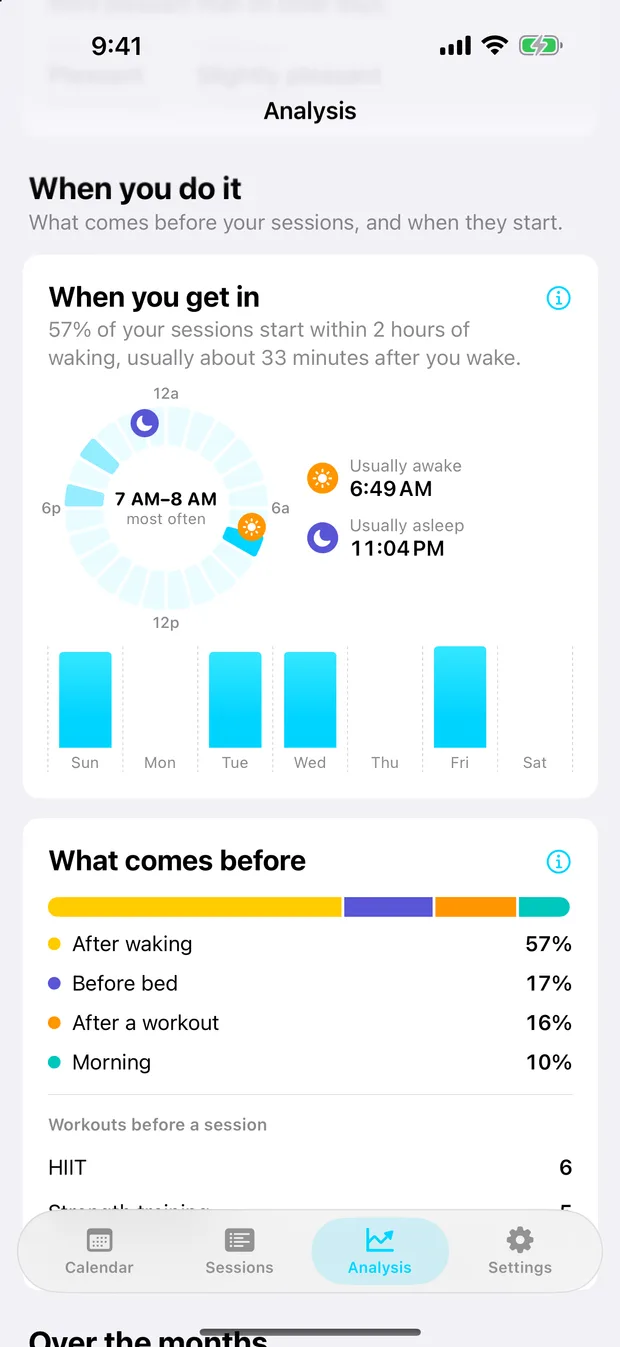
- When your sessions start, and what comes before them: waking up, a workout, or bed.
- How it is measured
- A session starting up to 2 hours after a workout of 10 minutes or more (from any app that saves workouts to Apple Health) counts as after a workout. Otherwise, one starting up to 2 hours after you woke counts as after waking, and one ending up to 3 hours before you fell asleep counts as before bed. The rest are morning, afternoon or evening. Wake and sleep times come from Apple Health sleep data. The clock shows how often sessions start in each hour, with your usual wake and sleep times over the last 60 nights.
- How to read it
- A description of your routine. Pair it with Sessions and your nights to see whether timing makes a difference for you.
- What it cannot tell you
- Needs sleep data for the waking and bedtime groups, and workouts saved to Apple Health for the workout group.
Sources
None. Your data means this describes your own sessions and Apple Health data rather than setting them against a published result.